Top 30 SQL Query Interview Questions

Categories:
 Written by:
Nathan Rosidi
Today we’re having a look at the top 30 SQL query interview questions and concepts that you must prepare for an SQL coding interview.
Last summer we published the ultimate guide to the SQL Interview Questions You Must Prepare. In it, we covered all the SQL areas that are, from our experience, required by the interviewers. These, along with coding, include theoretical knowledge about SQL and databases.
Now we will concentrate only on coding skills. In a way, it’s a sequel to the ultimate guide mentioned above, with this one being dedicated only to writing queries in SQL.
This singular skill will be here divided into six distinct technical concepts which will be used to solve, in total, 30 business problems.
We’ll start with the easiest, add one concept to the previous one(s) and end up with the most complex queries that include most or all of the concepts at the same time. With five questions in each category, this means covering 30 SQL query interview questions.
Here are the concepts we’ll talk about:
- Aggregating, Grouping, and Ordering Data
- Filtering Data
- Joins & Unions
- Subqueries & CTEs
- Window Functions
- Text & Date Manipulation
Aggregating, Grouping, and Ordering Data

These three SQL concepts usually come hand in hand. When you’re aggregating data, it usually means you’ll have to group it, too, and that way provide data with more insight and in a presentable form. Ordering data is also one of the tools to make data more user-friendly.
SQL Query Interview Question #1: Total Number Of Housing Units
The Airbnb question gives you the following information:
Total Number Of Housing Units
Find the total number of housing units completed for each year. Output the year along with the total number of housings. Order the result by year in ascending order.
Note: Number of housing units in thousands.
Link to the question: https://platform.stratascratch.com/coding/10167-total-number-of-housing-units
The dataset consists of the table housing_units_completed_us with the following columns:
The completed housing units are recorded according to the region. If you sum all the regions you get all the completed units. If you group data by the year and order it by the year ascendingly, you’ll get the correct result in the desired format.
Here’s the solution and its output.
SELECT year,
       SUM(south + west + midwest + northeast)  AS n_units
FROM housing_units_completed_us
GROUP BY 1
ORDER BY 1
| year | n_units |
|---|---|
| 2006 | 1979.5 |
| 2007 | 1503 |
| 2008 | 1119.5 |
| 2009 | 794.5 |
| 2010 | 651.7 |
| 2011 | 585 |
| 2012 | 649 |
| 2013 | 764.4 |
| 2014 | 462.8 |
SQL Query Interview Question #2: Find the Number of Entries per Star
It’s a Yelp’s question that asks:
Find the number of entries per star
Find the number of entries per star. Output each number of stars along with the corresponding number of entries. Order records by stars in ascending order.
Link to the question: https://platform.stratascratch.com/coding/10054-find-the-number-of-entries-per-star
Here you’ll also have to aggregate data, but this time using the COUNT() function. Output the columns question asks you to, then group and order data much as in the previous example.
Why don’t you use those hints in the widget below?
Your output should look like the one below.
SQL Query Interview Question #3: Find the Average Number of Stars for Each State
This is again a question by Yelp:
Find the average number of stars for each state
Find the average number of stars for each state. Output the state name along with the corresponding average number of stars.
Link to the question: https://platform.stratascratch.com/coding/10052-find-the-average-number-of-stars-for-each-state
Like in the previous questions, you have only one table at your disposal. Again, output only one column along with the aggregate values. Here you’ll have to use the AVG() function to get the solution. Also, the question doesn’t ask you to order data, so no need to use the ORDER BY clause.
Use the widget and hopefully you can get the output shown below it.
Your output should look like this:
| state | average_stars |
|---|---|
| PA | 3.7 |
| QC | 4.33 |
| ON | 3.78 |
| EDH | 5 |
| IL | 5 |
| WI | 4.75 |
| NC | 3.29 |
| NV | 3.25 |
| OH | 3.75 |
| AZ | 3.82 |
| BW | 4.17 |
SQL Query Interview Question #4: Find the Total Costs and Total Customers Acquired in Each Year
At Uber you could get a question like this:
Find the total costs and total customers acquired in each year
Find the total costs and total customers acquired in each year. Output the year along with corresponding total money spent and total acquired customers.
Link to the question: https://platform.stratascratch.com/coding/10009-find-the-total-costs-and-total-customers-acquired-in-each-year
This time you’ll be using the SUM() function two times: first to get the total costs and the second time to get the total customers. You need to show this data grouped on an annual level. No other calculations or ordering data is required.
The expected output has three columns and three rows:
Try to write the solution.
SQL Query Interview Question #5: Average Number Of Points
The last question in this category is by ESPN.
Average Number Of Points
Find the average number of points earned per quarterback appearance in each year. Each row represents one appearance of one quarterback in one game. Output the year and quarterback name along with the corresponding average points. Sort records by the year in descending order.
Link to the question: https://platform.stratascratch.com/coding/9965-average-number-of-points
This example asks you to use the AVG() aggregate function. Since you need to output the year and the quarterback’s appearance, you’ll also have to group by two rows, not only one. You’ll have to order the output by two rows, too. This time it’s in descending order, unlike the previous questions.
Here’s the output.
Do you think you can get it by using the hints we gave you?
Filtering Data and Conditional Statements

What we mean by filtering data is only the part of data that specifies set criteria. Even though using JOINs can also technically filter data, here we want to talk about the WHERE and HAVING clauses.
Conditional statements in PostgreSQL are represented through the CASE WHEN statements.
SQL Query Interview Question #6: Patrons Who Renewed Books
The City of San Francisco is interested in patrons and books.
Patrons Who Renewed Books
Find the number of patrons who renewed books at least once but less than 10 times in April 2015. Each row is an unique patron.
Link to the question: https://platform.stratascratch.com/coding/9931-patrons-who-renewed-books
Here we have a table named library_usage with the columns:
library_usage
Now, to answer the question’s requirements, we’ll use something we already know. The COUNT() function, that is. We’ll use it to count rows which will equal to number of patrons. There’s only one table and it will appear in the FROM clause. The question doesn’t ask to output all patrons. No, the output must show patrons whose total renewals are between one and nine. These renewals all have to be in April 2015. To filter data in such way we’ll have to use three WHERE clauses:
SELECT count(*) AS n_patrons
FROM library_usage
WHERE total_renewals BETWEEN 1 AND 9
  AND circulation_active_month = 'April'
  AND circulation_active_year = '2015'
The output is one number:
It means there are three patrons that renewed books less than ten times in April 2015.
SQL Query Interview Question #7: Find Out Search Details for Apartments Designed for a Sole-Person Stay
Airbnb is interested in knowing the answer to this question:
Solo Apartment Search
Find the search details for apartments where the property type is Apartment and the accommodation is suitable for one person.
Link to the question: https://platform.stratascratch.com/coding/9615-find-out-search-details-for-apartments-designed-for-a-sole-person-stay
Here you have to output all the columns from the table. However, the rows have to be filtered. Use the WHERE clause to find the accommodation that is for only one person and that is classified as an apartment in the table.
And these are the first few rows of the output you should aim for.
SQL Query Interview Question #8: Departments With Less Than 4 Employees
Amazon is interested in knowing the answer to this question:
Departments With Less Than 4 Employees
Find departments with less than 4 employees.
Output the department along with the corresponding number of workers.
Link to the question: https://platform.stratascratch.com/coding/9860-find-departments-with-less-than-4-employees
They give you the table worker:
worker
To answer the question, you’ll again have to filter data. This time you need to use HAVING instead of WHERE. They work the same in terms of syntax, but the main difference is WHERE is used before while HAVING is used after the GROUP BY clause. It’s also important to note that you need to use the COUNT() function two times: once in the SELECT statement and the second time in the HAVING clause.
Or translated to an SQL code:
SELECT
    department,
    COUNT(worker_id) AS num_of_workers
FROM worker
GROUP BY
    department
HAVING
COUNT(worker_id) < 4Run it to get the output we’re looking for.
| department | num_of_workers |
|---|---|
| Account | 3 |
This is the department with less than four employees.
SQL Query Interview Question #9: Departments With 5 Employees
Now it’s your turn to use the HAVING() clause and answer the Salesforce question:
Departments With 5 Employees
Last Updated: May 2019
Find departments with at more than or equal 5 employees.
Link to the question: https://platform.stratascratch.com/coding/9911-departments-with-5-employees
It’s not that different from the previous question. This time, you don’t need to show the number of employees, only the departments with five or more of them. It’s again the COUNT() function in the HAVING() clause.
Show us your solution here:
If you get it right, your solution will be this.
SQL Query Interview Question #10: Make a Report Showing the Number of Survivors and Non-survivors by Passenger Class
This interesting question is asked by Google:
Titanic Survivors and Non-Survivors
Make a report showing the number of survivors and non-survivors by passenger class. Classes are categorized based on the pclass value as:
• First class: pclass = 1
• Second class: pclass = 2
• Third class: pclass = 3
Output one row per survival status, with a column for the number of passengers in each class.
Link to the question: https://platform.stratascratch.com/coding/9881-make-a-report-showing-the-number-of-survivors-and-non-survivors-by-passenger-class
The table titanic has these columns:
titanic
This question does want us to filter data, in a way. It wants us to find certain data and allocate values to these data. It gives us a hint that we’ll have to use the CASE WHEN clause. We need to take the column pclass and check the values in it. If the value is 1, then it will be recorded as 1 in the new column first_class. If there’s value 2 in the column pclass, the value of 1 has to appear in the new column second_class. The same principle applies to the third class.
After you get this, you only need to the sum these values using the SUM() function. The data need to be grouped so that it shows survivors and non-survivors, which is shown in the column survived.
Finally, you’ll get this code:
SELECT survived,
       sum(CASE
               WHEN pclass = 1 THEN 1
               ELSE 0
           END) AS first_class,
       sum(CASE
               WHEN pclass = 2 THEN 1
               ELSE 0
           END) AS second_class,
       sum(CASE
               WHEN pclass = 3 THEN 1
               ELSE 0
           END) AS third_class
FROM titanic
GROUP BY survived
It results in the two-row output showing the survivors and non-survivors according to class.
| survived | first_class | second_class | third_class |
|---|---|---|---|
| 0 | 11 | 6 | 42 |
| 1 | 10 | 12 | 19 |
There were 11 non-survivors in the first class, six in the second class, and 42 in the third class. Of the survivors, ten were traveling in the first class. The second and the third class had 12 and 19 survivors, respectively.
JOINs and UNIONs

The following topics we’ll cover here is joining tables and merging query outputs.
As you already know, SQL JOINs are used to combine data from two or more tables, thus allowing much more possibilities in querying data than when working with only one table.
We use UNION and UNION ALL to merge the outputs of two or more SELECT statements. For this merging to work, the outputs of the queries must have the same number of columns and their data types have to be of the same data type. The difference between them is that UNION ALL merges all the records, including duplicate, while UNION keeps unique records.
SQL Query Interview Question #11: Find the Team Division of Each Player
The interview question which we’ll use to show you how the JOINs work is the one by ESPN.
Find the team division of each player
Find the team division of each player. Output the player name along with the corresponding team division.
Link to the question: https://platform.stratascratch.com/coding/9884-find-the-team-division-of-each-player
The data is divide into two tables.
How do we approach this question? We select the column player_name from the second table and the column division from the first table. To get the data from these columns, we need to INNER JOIN the tables on the columns school_name from both tables. There’s nothing else to this solution.
SELECT players.player_name,
       teams.division
FROM college_football_teams teams
INNER JOIN college_football_players players ON teams.school_name = players.school_name
Let’s try another one!
SQL Query Interview Question #12: Sales With Valid Promotion
Here’s a question by Meta/Facebook:
Sales with Valid Promotion
Last Updated: October 2021
The marketing manager wants you to evaluate how well the previously ran advertising campaigns are working.
Particularly, they are interested in the promotion IDs from the online_promotions table.
Calculate the percentage of orders in the online_orderstable that used a promotion from the online_promotions table.
Link to the question: https://platform.stratascratch.com/coding/2069-sales-with-valid-promotion
Here you’ll again have to JOIN two tables. This time it’s the LEFT JOIN, but it works the same way as the INNER JOIN syntax-wise. To get the percentage, you’ll have to use the COUNT() function both in the numerator and the denominator. Also, convert the result and multiply it by 100 to get the percentage with decimal points.
Here’s what your code needs to do.
| percentage |
|---|
| 75.86 |
Write the solution in the widget.
SQL Query Interview Question #13: Transactions by Billing Method and Signup ID
Here’s a bit more complicated JOIN question by Noom.
Transactions By Billing Method and Signup ID
Last Updated: April 2021
Provide a list of signups with a transaction start date earlier than May 2020.
For these users, calculate the average transaction value using only transactions that occurred before May 2020, grouped by billing cycle.
The output should include the billing cycle, signup ID, and average transaction amount, sorted by billing cycle in reverse alphabetical order and signup ID in ascending order
Link to the question: https://platform.stratascratch.com/coding/2031-transactions-by-billing-method-and-signup-id
The solution has to use the AVG() aggregate function, no doubt. Also, you’ll want to use two INNER JOINs here, because you need to output data from all three available tables. The question tells you to filter data according to start date. Calculate ten months before March 2021 and use the result in the WHERE clause. Also, you’ll need to group data by the billing cycle and signup_id. When you order data, you need to do it both ascendingly and descendingly.
Try to write your own solution and see if it returns the same few rows as the result below.
SQL Query Interview Question #14: Make the Friends Network Symmetric
We didn’t talk about the UNION and UNION ALL, but this will change with the next two questions. The first one is by Google.
Make the friends network symmetric
Make the friends network symmetric. For example, if 0 and 1 are friends, have the output contain both 0 and 1 under 1 and 0 respectively.
Link to the question: https://platform.stratascratch.com/coding/9813-make-the-friends-network-symmetric
The question wants you to only use the table google_friends_network and its two columns.
This is a rather easy question to solve if you know how to use UNION. All you got to do is output the user ID and the friend ID with the first SELECT statement. The second SELECT statement will be the same, only the order of the columns in the output will be reversed. To get these two results in one output, you’d want to use the UNION operator like this:
SELECT user_id,
       friend_id
FROM google_friends_network
UNION
SELECT friend_id AS user_id,
       user_id AS friend_id
FROM google_friends_network
It should return the following result.
The users 0 and 2, for example, appear both as users and friend, which is the point. The same is true for all other users.
SQL Query Interview Question #15: Find Employees in the HR Department and Output the Result With One Duplicate
Here we’ll show the question asked by Amazon.
Duplicate HR Department Employees
Generate a list of employees who work in the HR department, including only their first names and department in the output. Each employee should appear twice in the list, meaning their first name and department should be duplicated in the output.
Link to the question: https://platform.stratascratch.com/coding/9858-find-employees-in-the-hr-department-and-output-the-result-with-one-duplicate
The approach to the solution should be similar to the example above. This time you’ll use UNION ALL instead of UNION. Why? Because the question asks you to return the duplicate results. Both SELECT statements that you’ll write should be exactly the same because they select two columns from the table. Also, you need only data from the HR department, so use that info in the WHERE clause.
Did you get this result?
Subqueries and CTEs

We’re building up your readiness for the SQL interview, so we’ll freely start using all the previous concepts. You should be comfortable with them by now.
The subqueries are the queries written in the other query. They usually appear in the SELECT, FROM, and WHERE.
The SQL Common Table Expressions or CTEs are the tidier version of subqueries. They result in a table similar to the temporary table. This table isn’t stored anywhere and can be accessed only after the CTE is executed. One of the main benefits compared to the subqueries is that the CTEs are reusable and can be referenced in the coming SELECT statement like any other table.
SQL Query Interview Question #16: Successfully Sent Messages
The first question we’re going to show here is one by Meta/Facebook.
Successfully Sent Messages
Last Updated: June 2018
Find the ratio of successfully received messages to sent messages.
Link to the question: https://platform.stratascratch.com/coding/9777-successfully-sent-messages
The question gives you two tables to work with.
Now we have to use the subqueries. Both will be used in the same SELECT statement: one as the numberer the other one as the numerator, the other one as the denominator. Yes, we’re going to divide one subquery with the another one.
SELECT
  (SELECT CAST(COUNT(*) AS decimal)
   FROM facebook_messages_received)/
  (SELECT COUNT(*)
   FROM facebook_messages_sent)
One query will return the number of the received messages by using the COUNT() function. Its result will be:

The other subquery will also use the COUNT() function, but to return the number of the sent messages:

Run together as the question solution and they will return this output.
Really, three divided by 5 is 0.6.
SQL Query Interview Question #17: Find the Most Profitable Company in the Financial Sector of the Entire World Along With Its Continent
If you want to work at Forbes, you should expect this question.
Most Profitable Financial Company
Find the most profitable company from the financial sector. Output the result along with the continent.
Link to the question: https://platform.stratascratch.com/coding/9663-find-the-most-profitable-company-in-the-financial-sector-of-the-entire-world-along-with-its-continent
To solve it, you’ll again need to use the subquery. This time, it’ll be a subquery in the WHERE clause. You should use it to get the highest profit in the financial sector. The other criteria in the outer query’s WHERE clause should also be the company’s sector.
Use the widget and try to get the following result.
SQL Query Interview Question #18: Top 10 Songs
Here’s an interview question by Spotify.
Top 10 Songs
Find the number of unique songs of each artist which were ranked among the top 10 over the years. Order the result based on the number of top 10 ranked songs in descending order.
Link to the question: https://platform.stratascratch.com/coding/9743-top-10-songs
To solve this question, use the COUNT() function. It will get you the distinct songs by the artists. This time you’ll not be listing the table in the FROM clause, but you’ll write a subquery there. Use it to find artists and their songs that were ranked 10 or higher. In the main SELECT statement you’ll need to group and order data like this, at least partially.
Can you get the same result?
SQL Query Interview Question #19: Liking Score Rating
The question by Meta/Facebook is perfect to show you how the CTE works.
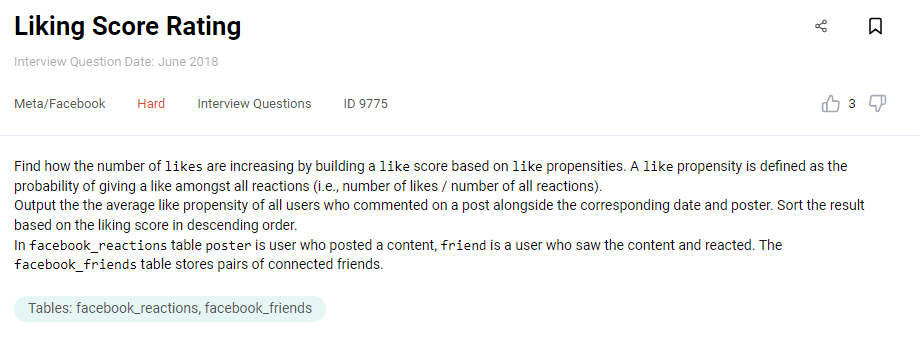
Link to the question: https://platform.stratascratch.com/coding/9775-liking-score-rating
The table facebook_reactions has the columns:
facebook_reactions
| poster | int |
| friend | int |
| reaction | varchar |
| date_day | int |
| post_id | int |
Here’s the sample of the data.

Another table you’ll have to use is facebook_friends:
| user1 | int |
| user2 | int |
Below is the data.
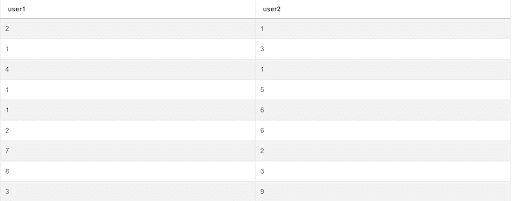
What you got to do here to write a correct solution is write a CTE. You do that by using the keyword WITH, after which comes the CTE name, then follows the AS keyword that introduces the CTE definition. (The CTE’s SELECT statement, in other words).
In our case, the CTE is named p.
WITH p AS
  (SELECT SUM(CASE
                  WHEN reaction = 'like' THEN 1
                  ELSE 0
              END)/COUNT(*)::decimal AS prop,
          friend
   FROM facebook_reactions
   GROUP BY 2)
We use this CTE to calculate the propensity by dividing the number of likes with the number of all reactions. If you run only this SELECT statement, you’ll get this:
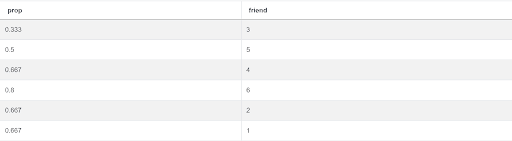
It’s a propensity per friend.
To get the average propensity, along with the date and poster, you’ll need to join the CTE with the table facebook_reactions, and use the AVG() function. This second part of the solution is:
SELECT date_day,
       poster,
       avg(prop)
FROM facebook_reactions f
JOIN p ON f.friend= p.friend
GROUP BY 1,
         2
ORDER BY 3 DESC
It can’t be run separately from the CTE because it references the CTE and its result can’t be, you’ll remember that, used unless the query has been run. So the complete solution is:
WITH p AS
  (SELECT SUM(CASE
                  WHEN reaction = 'like' THEN 1
                  ELSE 0
              END)/COUNt(*)::decimal AS prop,
          friend
   FROM facebook_reactions
   GROUP BY 2)
SELECT date_day,
       poster,
       avg(prop)
FROM facebook_reactions f
JOIN p ON f.friend= p.friend
GROUP BY 1,
         2
ORDER BY 3 DESC
And here’s the output.

SQL Query Interview Question #20: Common Friends Friend
This is a hard question by Google, but give it a try.
Common Friends Friend
Last Updated: February 2019
Find the number of a user's friends' friend who are also the user's friend. Output the user id along with the count.
Link to the question: https://platform.stratascratch.com/coding/9821-common-friends-friend
To solve this question, again use the CTE. This time, it will consist of two SELECT statements and you’ll merge their results using the UNION. That way you get users and their friend, something that we already did in one of the questions above.
Once you write the CTE, use the COUNT() function to find the number of friends. This will be a bit more complex query that will use subquery in the FROM clause. The subquery will reference the CTE three times, which means the CTE will be self-joined and then grouped by the user ID.
Here’s what you get if the solution is correct.
Window Functions

The SQL window functions are a valuable SQL feature most useful when you want to show the aggregated and the non-aggregated data at the same time. They share some similarities with the aggregate functions. However, the SQL aggregate functions lose the individual rows while the window functions don’t.
SQL Query Interview Question #21: Most Profitable Companies
We’ll use the Forbes question to show you the window functions.
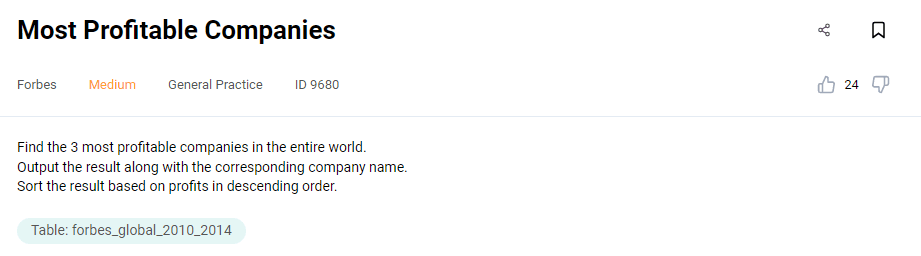
Link to the question: https://platform.stratascratch.com/coding/9680-most-profitable-companies
The table forbes_global_2010_2014 consists of the following columns:
forbes_global_2010_2014
| company | varchar |
| sector | varchar |
| industry | varchar |
| continent | varchar |
| country | varchar |
| marketvalue | float |
| sales | float |
| profits | float |
| assets | float |
| rank | int |
| forbeswebpage | varchar |
The data is:
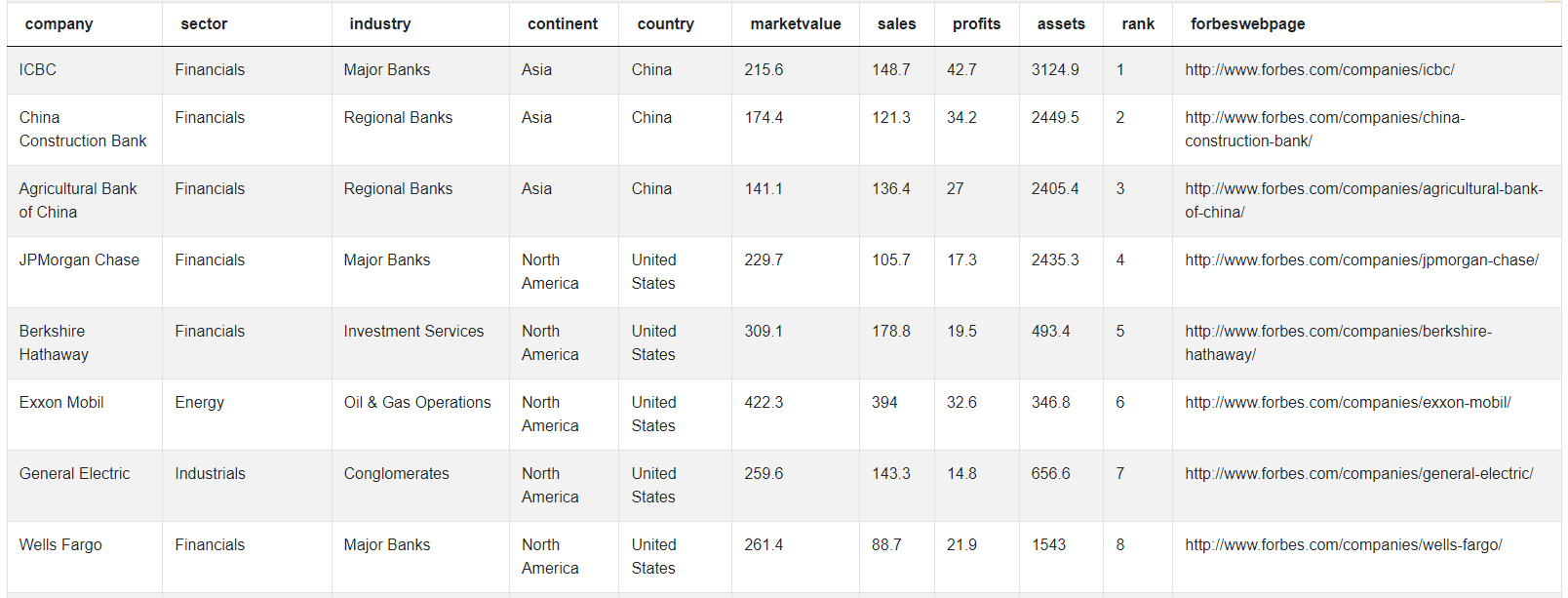
Here’s how we’re going to approach the solution. We’ll write two subqueries: one in the main query’s FROM clause and the other one in the subquery’s. Their purpose is to find the companies and their profit, then rank them according to that. Here’s how these two subqueries look.
SELECT *,
       dense_rank() OVER (
                          ORDER BY profit DESC) AS rank
FROM
  (SELECT company,
          sum(profits) AS profit
   FROM forbes_global_2010_2014
   GROUP BY company) sq
Even though the first SELECT statement now looks like the regular SELECT statement, it is a subquery, though. You’ll realize that once we write the main SELECT statement.
Notice there’s a window function DENSE_RANK(). This and other window functions are introduced by the OVER() clause. This clause can remain empty, but it also can contain PARTITION BY and/or the ORDER BY clause. The ORDER BY here tells the window function to rank according to profit from the highest to the lowest one.
This the subqueries’ partial output.
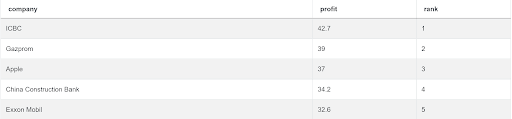
We got the companies rank and their profit. Now we have to put these subqueries within the main query that will output the company and its profit, and then use the WHERE clause to show only the companies with the ranking 3 or higher.
The complete solution to this question is:
SELECT company,
       profit
FROM
  (SELECT *,
          dense_rank() OVER (
                             ORDER BY profit DESC) AS rank
   FROM
     (SELECT company,
             sum(profits) AS profit
      FROM forbes_global_2010_2014
      GROUP BY company) sq) sq2
WHERE rank <=3
It should give you the output shown below.

This tells us the three most profitable companies are ICBC, Gazprom, and Apple.
SQL Query Interview Question #22: Lowest Priced Orders
Another example where you’ll have to use the window functions is this question by Amazon.
Lowest Priced Orders
Last Updated: May 2019
Find the lowest order cost of each customer. Output the customer id along with the first name and the lowest order price.
Link to the question: https://platform.stratascratch.com/coding/9912-lowest-priced-orders
To find the lowest order, use the FIRST_VALUE() window function. It will give you the first value in the set of values. Also, you’ll have to use both the PARTITION BY and the ORDER BY clauses. To get all data you need you’ll have to join the tables you have at your disposal.
If you got everything right, your output will be the same.
SQL Query Interview Question #23: Fastest Hometowns
Deloitte asks you the following:
Fastest Hometowns
Last Updated: October 2021
Find the hometowns with the top 3 average net times. Output the hometowns and their average net time. Keep in mind that a lower net_time is better. In case there are ties in net time, return all unique hometowns.
Link to the question: https://platform.stratascratch.com/coding/2066-fastest-hometowns
Write the solution so that you use the subquery. Use it to find the hometown, average net time and the rank according to it. To achieve that, use the AVG() and DENSE_RANK() window functions. Embed this subquery within the query that will filter only data with the top 3 rank.
Try to get this output.
SQL Query Interview Question #24: Days at Number One
Things will get more complicated with this and the next question. Spotify gives you these instructions:
Days At Number One
Find the number of days a US track has stayed in the 1st position for both the US and worldwide rankings on the same day. Output the track name and the number of days in the 1st position. Order your output alphabetically by track name.
If the region 'US' appears in dataset, it should be included in the worldwide ranking.
Link to the question: https://platform.stratascratch.com/coding/10173-days-at-number-one
Use the subquery in the FROM clause to get the track name and the number of days at the 1st position. You’ll have to do it by using the SUM() function and the CASE WHEN statement inside it. Also, this SUM() function will not be the ordinary aggregate one, but the window function. Join the tables you have and filter data to only get those where the position is 1.
The main query will then use this subquery and the MAX() function to get the result:
SQL Query Interview Question #25: Most Expensive and Cheapest Wine
Here’s the final interview question for practicing the window functions. The question is by Wine Magazine.
Most Expensive And Cheapest Wine
Last Updated: March 2020
Find the cheapest and the most expensive variety in each region. Output the region along with the corresponding most expensive and the cheapest variety. Be aware that there are 2 region columns, the price from that row applies to both of them.
Note: The results set contains no ties.
Link to the question: https://platform.stratascratch.com/coding/10041-most-expensive-and-cheapest-wine
Approach writing a code in the following way. First write two CTEs. The first CTE will have two SELECT statements and they will show the wine variety, region and price. Combine their outputs into one.
The second CTE will reference the first one to rank wines using the ROW_NUMBER() window function and getting the rank from the most expensive to the cheapest wine and vice versa.
After that comes the SELECT statement that references the second CTE. To get the desired output, you have to use the CASE WHEN statement in two MAX() functions: one to get the variety of the most expensive wine, the other to get the cheapest wine’s variety. You’re interested only in the cheapest and the most expensive wine, so you’ll have to filter data using the WHERE clause.
If you get the below result, then you got everything right.
Text & Date Manipulation

The last topic we’ll cover here is different ways of working with the date and text data types.
SQL Query Interview Question #26: Combine the First and Last Names of Workers
One of the most common things you can be asked to do when working with text data is to concatenate two or more columns from the table. Here’s what exactly Amazon wants you to do.
Combine Workers First and Last Names
Combine the first and last names of workers with a space in-between in a column 'full_name'.
Link to the question: https://platform.stratascratch.com/coding/9834-combine-the-first-and-last-names-of-workers
The table at your disposal is worker.
You see they want you to put the employee’s first and last name in one column. Here’s how you do it:
SELECT first_name || ' ' || last_name AS full_name
FROM worker
Select the employee’s first name, then follow it up with two vertical lines ||. What follows after that will be concatenated with the first name. We want the blank space to come after the first name, so we put blank space in the single quotation marks. After that again comes the sign for concatenation, and then the employee’s last name.
This will give their names in the new column full_name.
| full_name |
|---|
| Monika Arora |
| Niharika Verma |
| Vishal Singhal |
| Amitah Singh |
| Vivek Bhati |
| Vipul Diwan |
| Satish Kumar |
| Geetika Chauhan |
| Agepi Argon |
| Moe Acharya |
| Nayah Laghari |
| Jai Patel |
| Jura Jomun |
SQL Query Interview Question #27: Print the First Three Characters of the First Name
We’re staying with Amazon and their question that again give you the same table as the question above.
First Three Characters of First Name
Print the first three characters of the first name.
Link to the question: https://platform.stratascratch.com/coding/9828-print-the-first-three-characters-of-the-first-name
This question is easy to solve if you know how the SUBSTRING() function works. Use it to get the following result:
SQL Query Interview Question #28: Count the Number of Words per Row in Both Words Lists
Here’s one Google question that’s more complicated.
Count the number of words per row in both words lists
Count the number of words per row in both words lists.
Link to the question: https://platform.stratascratch.com/coding/9812-count-the-number-of-words-per-row-in-both-words-lists
Use the LENGTH() and the REPLACE() function to get the answer. Remember, LENGTH() is used to count the number of characters in string. REPLACE() searches one character in a string, and replaces it with another.
Here’s what you need to output:
SQL Query Interview Question #29: Users Activity per Month Day
This question by Meta/Facebook will test your knowledge on working with dates.
Users Activity Per Month Day
Last Updated: January 2021
Return the total number of posts for each month, aggregated across all the years (i.e., posts in January 2019 and January 2020 are both combined into January). Output the month number (i.e., 1 for January, 2 for February) and the total number of posts in that month.
Link to the question: https://platform.stratascratch.com/coding/2006-users-activity-per-month-day
You’re given the facebook_posts table.
How do you solve this question? The trick here is to use the DATE_PART() function. It will get you the day from the column post_date. The COUNT() function is there to find the number of posts. Also, convert the data type to date. Finally, group the result by the day and you get the correct solution.
SELECT date_part('day', post_date::date),
       count(*)
FROM facebook_posts
GROUP BY date_part('day', post_date::date)
Its output is here.
SQL Query Interview Question #30: Find All Workers Who Joined on February 2014
We’ll finish this off with the question by Amazon. It asks you:
Employees Who Joined in February 2014
Find all workers who joined on February 2014.
Link to the question: https://platform.stratascratch.com/coding/9844-find-all-workers-who-joined-on-february-2014
Here you’ll need to use the EXTRACT function to get the year and month for the data available and do it in the WHERE clause. The data also has to be cast to a date type.
Here’s the output:
And the answer? Write it in the widget and let’s see what’ll happen.
Conclusion
With covering 30 questions we gave you a thorough understanding of the SQL coding interview questions. These questions cover six major topics you have to be skilled in.
They cover data aggregation, grouping, ordering, filtering, and using the conditional statements. To combine data there are JOINs and UNION. As the queries get more complex, you’ll start using subqueries, CTEs, and the window functions. All that has also include the knowledge on working with text and dates.
It’s not enough to know all these SQL concepts. To score more points you should be able to structure your SQL code well when providing the answer to the interview question.
Share